
Tesla Home Charging Guide: Everything You Need to Know in 2026
Buying a Tesla is exciting — but figuring out how to charge it at home can feel surprisingly complicated. Should you use the included Mobile Connector? Splurge on the Tesla Wall Connector? Or save money with a third-party Level 2 charger that works just as well?
In this comprehensive tesla home charging guide, we break down every option available to Tesla owners in 2026, compare charging speeds across all current models, and give you an honest take on whether you actually need the Tesla-branded Wall Connector. Spoiler: for most people, a quality third-party charger delivers the same performance at a lower price.
Whether you drive a Model 3, Model Y, Model S, or Model X, this guide will help you make an informed decision and start charging smarter at home.
Prices, availability, and program terms are subject to change. Last verified: March 15, 2026. We strive for accuracy but recommend verifying details before purchase.
Tesla Home Charging Options Explained
Tesla owners have three primary ways to charge at home. Each option has trade-offs in terms of cost, installation complexity, and charging speed. Understanding the differences is the first step toward choosing the right setup for your daily driving needs.
1. Tesla Mobile Connector (Level 1 / Level 2)
The Tesla Mobile Connector is a portable charging cable that plugs into a standard wall outlet or a higher-powered NEMA outlet using swappable adapters. As of 2026, Tesla no longer includes a Mobile Connector with new vehicle purchases — it is sold separately for $200, and additional NEMA adapters cost $35–$45 each.
When plugged into a standard 120V household outlet (NEMA 5-15), the Mobile Connector delivers Level 1 charging at roughly 3–5 miles of range per hour. This is painfully slow for most drivers but can work in a pinch or for plug-in hybrids. When paired with a 240V NEMA 14-50 outlet, the Mobile Connector steps up to Level 2 charging at up to 30 miles of range per hour — enough for most daily commuters to fully replenish overnight.
The Mobile Connector is an excellent option for renters, travelers, or Tesla owners who want a backup charger. However, it maxes out at 32 amps, which limits its top speed compared to hardwired alternatives.
2. Tesla Wall Connector (Level 2 — Hardwired)
The Tesla Wall Connector is Tesla's flagship home charger, priced at $475 from Tesla's online store. It is a hardwired unit that can deliver up to 48 amps on a 60-amp circuit, translating to approximately 44 miles of range per hour for the Model 3 and Model Y.
Key features of the Wall Connector include:
- Wi-Fi connectivity for over-the-air firmware updates and basic usage tracking
- Power sharing — you can daisy-chain up to six Wall Connectors on a single circuit, and they will automatically split the available power
- Sleek, integrated design that matches Tesla's aesthetic
- 24-foot cable length — long enough for most garage setups
- Indoor/outdoor rated (NEMA 3R enclosure)
The Wall Connector requires professional installation and a dedicated 60-amp circuit. Total installed cost typically ranges from $700 to $1,200 depending on your electrical panel's proximity to the installation location.
3. Third-Party J1772 Chargers (with Tesla Adapter)
Here is where things get interesting for budget-conscious Tesla owners. Since late 2023, all new Tesla vehicles in North America use the NACS (North American Charging Standard) port natively. Older Teslas with a proprietary connector can use Tesla's included J1772 adapter.
Third-party Level 2 chargers from brands like Lectron, Wallbox, ChargePoint, Grizzl-E, and Emporia can charge your Tesla at the exact same speed as the Wall Connector — up to 48 amps — often at a significantly lower price. Many also offer features Tesla's Wall Connector lacks, such as energy monitoring, load management, and integration with home energy systems.
With the industry standardizing on NACS, several third-party manufacturers now offer chargers with native NACS connectors, eliminating the need for any adapter at all. This makes third-party chargers a compelling alternative for Tesla owners who want flexibility and value.
Tesla Wall Connector vs Third-Party Chargers
One of the most common questions new Tesla owners ask is whether the official Wall Connector is worth the premium over third-party options. The short answer: it depends on your priorities. Here is a detailed comparison to help you decide.
| Feature | Tesla Wall Connector | Lectron V-Box 48A | Wallbox Pulsar Plus |
|---|---|---|---|
| Price | $475 | $304 | $649 |
| Max Amperage | 48A | 48A | 48A |
| Max Charging Speed | 11.5 kW | 11.5 kW | 11.5 kW |
| Connector | NACS | J1772 / NACS | J1772 / NACS |
| Wi-Fi | Yes | Yes | Yes |
| App Control | Limited (via Tesla app) | Yes (Lectron app) | Yes (myWallbox app) |
| Energy Monitoring | No | Yes | Yes |
| Smart Scheduling | Via Tesla car | Yes (charger-side) | Yes (charger-side) |
| Load Management | Power sharing only | No | Yes (Power Boost) |
| Cable Length | 24 ft | 24 ft | 25 ft |
| NEMA Rating | NEMA 3R | NEMA 4 | NEMA 4 |
| Works with Non-Tesla EVs | No (NACS only) | Yes | Yes |
| Warranty | 4 years | 3 years | 3 years |
As the table shows, third-party chargers match or exceed the Tesla Wall Connector in nearly every category. The Lectron V-Box 48A delivers identical charging speed at $96 less, includes energy monitoring, and works with any EV — a significant advantage if your household has or plans to have a non-Tesla electric vehicle.
The Wallbox Pulsar Plus costs more than the Tesla Wall Connector but includes Power Boost load management, a more robust app experience, and one of the most compact form factors on the market. It is a premium choice for smart-home enthusiasts.
The Tesla Wall Connector's main advantages are its seamless integration with the Tesla ecosystem, power-sharing capability for multi-Tesla households, and the brand consistency that some owners prefer. But from a pure performance standpoint, it offers no charging speed advantage.
How Fast Can You Charge a Tesla at Home?
Charging speed at home depends on three factors: your charger's amperage, your Tesla model's onboard charger capacity, and the battery size. All current Tesla models have an onboard charger rated for up to 48 amps (11.5 kW) on a single-phase 240V connection.
Here is a comprehensive breakdown of home charging times for every 2026 Tesla model. We show times from 10% to 90% state of charge, which is the recommended daily charging window for lithium-ion battery longevity.
| Tesla Model | Battery Size | Usable kWh (10–90%) | Time at 12A / 120V (1.4 kW) | Time at 32A / 240V (7.7 kW) | Time at 48A / 240V (11.5 kW) |
|---|---|---|---|---|---|
| Model 3 Standard | 60 kWh | 48 kWh | ~34 hours | ~6.2 hours | ~4.2 hours |
| Model 3 Long Range | 82 kWh | 65.6 kWh | ~47 hours | ~8.5 hours | ~5.7 hours |
| Model Y Standard | 60 kWh | 48 kWh | ~34 hours | ~6.2 hours | ~4.2 hours |
| Model Y Long Range | 82 kWh | 65.6 kWh | ~47 hours | ~8.5 hours | ~5.7 hours |
| Model S | 100 kWh | 80 kWh | ~57 hours | ~10.4 hours | ~7.0 hours |
| Model X | 100 kWh | 80 kWh | ~57 hours | ~10.4 hours | ~7.0 hours |
A few important takeaways from this data:
- Level 1 (120V) is impractical for anything other than emergency use. Even the smallest Tesla battery takes over 34 hours to charge from 10% to 90% on a standard household outlet.
- A 32A Level 2 charger (like the Mobile Connector on a NEMA 14-50) handles most daily driving easily. If you drive 40 miles per day, you only need about 2–3 hours of charging per night.
- A 48A charger (Wall Connector or equivalent third-party) is ideal for long-range models, heavy daily drivers, or households where the car needs to be ready quickly. The speed difference between 32A and 48A is roughly 30–35% faster.
You can calculate your exact charging costs and times using our EV Charging Time Calculator and EV Charging Cost Calculator.
Keep in mind that real-world charging speeds may vary slightly based on ambient temperature, battery state of health, and whether the battery is preconditioning. Cold weather in particular can slow home charging — see our guide on EV charging in cold weather for details.
Do You Need the Tesla Wall Connector?
Let us be honest: most Tesla owners do not need the Tesla Wall Connector. This might sound surprising coming from an EV charging site, but the data supports it.
The Average Driver's Reality
According to the U.S. Department of Energy, the average American drives about 37 miles per day. For a Tesla Model 3 or Model Y, that is roughly 10–12 kWh of energy consumption. A 32-amp Mobile Connector on a NEMA 14-50 outlet replenishes that in under 2 hours.
So unless you are driving 100+ miles daily or need your car charged and ready in a very short window, the Mobile Connector paired with a 240V outlet provides more than enough overnight charging capacity.
When the Wall Connector Makes Sense
There are legitimate scenarios where the Tesla Wall Connector (or an equivalent 48A charger) is the right choice:
- Heavy daily driving (80+ miles/day): Rideshare drivers, long commuters, and real estate agents who cover significant daily mileage benefit from the faster 48A charging.
- Model S or Model X owners: The 100 kWh battery packs in these vehicles take over 10 hours at 32A. At 48A, that drops to about 7 hours — a meaningful improvement.
- Multi-Tesla households: If you have two Teslas sharing one circuit, the Wall Connector's power-sharing feature is genuinely useful.
- Future-proofing: If you plan to upgrade to a larger-battery vehicle, having 48A capacity already installed saves you from upgrading later.
When You Can Skip It
You can confidently skip the Wall Connector and use a more affordable solution if:
- You drive fewer than 60 miles per day on average
- Your car sits in the garage for 8+ hours overnight
- You already have a NEMA 14-50 outlet installed (e.g., from a dryer or RV hookup)
- You want a charger that works with any EV brand, not just Tesla
- Budget is a primary concern
The Smart Budget Move
For most Tesla owners on a budget, our recommendation is to start with the Tesla Mobile Connector ($200) + NEMA 14-50 adapter ($45) and a professionally installed NEMA 14-50 outlet ($200–$500). Total cost: approximately $445–$745. This setup delivers 30 miles of range per hour — more than enough for daily use.
If you want a permanent wall-mounted solution with more features, consider a budget-friendly Level 2 charger like the Lectron V-Box 48A, which matches the Wall Connector's speed at a lower price while adding energy monitoring and universal EV compatibility.
Best Third-Party Chargers for Tesla
If you have decided that a third-party charger is the right move — and for most Tesla owners, it is — here are the options we recommend most frequently. Each of these has been tested extensively and delivers reliable, full-speed charging for every Tesla model.
Budget Pick: Lectron V-Box 48A — $304
The Lectron V-Box 48A is our top value recommendation for Tesla owners. At $304, it undercuts the Tesla Wall Connector by nearly $100 while delivering identical 48-amp, 11.5 kW charging speed. It features Wi-Fi connectivity, an intuitive app for scheduling and energy monitoring, and a NEMA 4 weatherproof rating that actually exceeds the Wall Connector's NEMA 3R.
The V-Box is available with both J1772 and NACS connectors, so newer Tesla owners can charge without any adapter. It is hardwired, requires a 60-amp breaker, and comes with a 24-foot charging cable. Build quality is solid, and Lectron's customer support has improved significantly over the past two years.
Premium Pick: Wallbox Pulsar Plus — $649
The Wallbox Pulsar Plus is for Tesla owners who want the best smart-charging experience available. Its compact design is the smallest in its class, yet it packs 48-amp charging, Power Boost dynamic load management, and one of the most polished apps in the industry.
Power Boost is a standout feature: it monitors your home's electrical panel in real time and automatically adjusts charging speed to prevent overloads. This can save you thousands on a panel upgrade if your home is near capacity. The myWallbox app also supports detailed energy tracking, cost calculations, and integration with solar systems.
Other Worthy Options
Depending on your needs, you might also consider:
- ChargePoint Home Flex ($699): Premium build quality and the most flexible amperage adjustment (16A to 50A). Ideal for homes with varying electrical capacity.
- Grizzl-E Classic ($399): The toughest charger on the market with a NEMA 4 rating and a focus on extreme-weather durability. Perfect for outdoor installations or cold climates.
- Emporia Smart ($159): The best ultra-budget option with energy monitoring and smart features at an unbeatable price.
For a complete comparison of all these options, check out our best cheap Level 2 EV chargers guide and our best EV charger under $300 roundup.
Tesla Charging Settings and Tips
Once your home charger is installed, optimizing your Tesla's charging settings can save you money, extend battery life, and ensure your car is always ready when you need it. Here are the most impactful settings and tips every Tesla owner should know.
Set a Daily Charge Limit of 80–90%
Tesla recommends keeping your daily charge limit at 80% for standard-range batteries and 90% for long-range batteries. Charging to 100% regularly accelerates battery degradation because it keeps the cells at a higher voltage state for longer periods. Only charge to 100% before a long road trip, and try to start the trip promptly after reaching full charge.
You can set this in the Tesla app under Charging > Charge Limit, or directly on the car's touchscreen.
Use Scheduled Charging to Save on Electricity
Most utility companies offer time-of-use (TOU) rates with significantly cheaper electricity during off-peak hours — typically 9 PM to 6 AM. Tesla's built-in scheduled charging feature lets you plug in whenever you get home but delay charging until rates drop.
To enable this: go to Charging > Schedule > Departure or Start Time. We recommend using "Start Time" mode and setting it to match your utility's off-peak window. This alone can cut your home charging costs by 30–50%.
Use our EV Charging Cost Calculator to estimate your monthly savings with off-peak charging.
Reduce Amperage If You Have Panel Constraints
If your home's electrical panel is near capacity, you do not necessarily need a panel upgrade. Tesla allows you to manually set the charging amperage in the car's settings. Reducing from 48A to 32A or even 24A still provides plenty of overnight charging capacity for most drivers, while drawing significantly less power from your panel.
This setting is found at Charging > Charge Current on the touchscreen.
Precondition the Battery in Cold Weather
If you live in a cold climate, use the Scheduled Departure feature to precondition your battery before your morning drive. This warms the battery to its optimal temperature using wall power (instead of draining the battery), which improves both range and regenerative braking performance. Learn more in our detailed guide on EV charging in cold weather.
Monitor Charging with Third-Party Apps
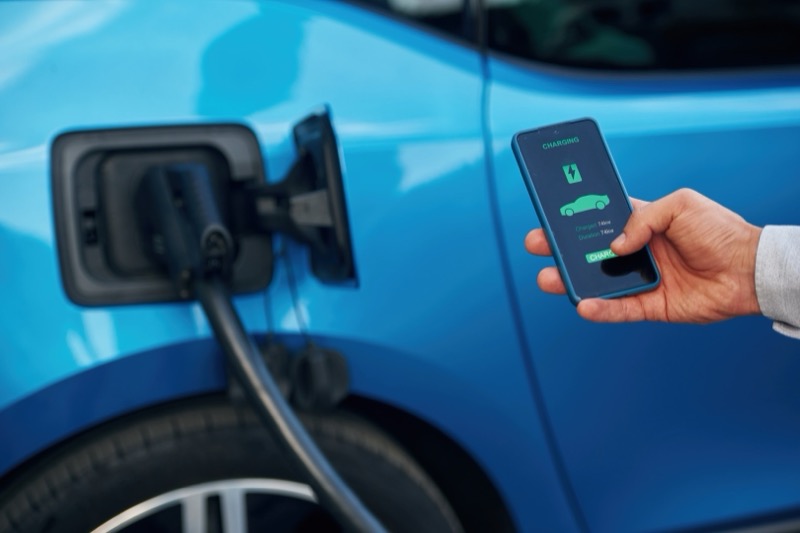
While the Tesla app provides basic charging stats, third-party apps like TeslaFi and Tessie offer much deeper insights — including per-session cost tracking, efficiency trends, battery degradation monitoring, and charge curve analysis. If you are data-driven, these apps are worth the subscription.
Keep the Charge Port Clean
This one is often overlooked. Dust, debris, and moisture in the charge port can cause connection issues and slower charging. Periodically inspect and clean the charge port with a dry, soft cloth. If you park outdoors, consider a charge port cover for extra protection.
For more details on Tesla's charging specifications and troubleshooting, visit the official Tesla Home Charging Support page.
Recommended Products
As an Amazon Associate, we earn from qualifying purchases at no extra cost to you. Learn more
Lectron V-Box 48A
Full 48-amp charging speed with energy monitoring and NACS support — the best value alternative to the Tesla Wall Connector.
Wallbox Pulsar Plus
Compact, smart, and feature-rich with Power Boost load management. Premium pick for smart-home enthusiasts.
Related Articles & Tools
Frequently Asked Questions
Can I charge a Tesla with a regular 120V outlet?
Do I need the Tesla Wall Connector or can I use a third-party charger?
How much does it cost to install a Tesla home charger?
How long does it take to fully charge a Tesla at home?
Should I charge my Tesla to 100% every night?
Can I use a non-Tesla charger with my Tesla?
What is the difference between NACS and the old Tesla connector?
How much electricity does a Tesla use per month?
CheapEVCharger Editorial Team
Independent EV charging editorial team. We compare home chargers based on manufacturer specifications, verified Amazon customer reviews, and real-time pricing data — never influenced by manufacturers.
Data sources: Product specifications from manufacturer websites, pricing and customer reviews from Amazon.com and Amazon.de, installation costs from industry reports, electricity rates from U.S. EIA and DOE.
Enjoyed this article?
Practical EV home-charging tips, honest charger picks, and NACS-transition updates — straight to your inbox.
No spam. Unsubscribe anytime.